Recently I've found a convenient application that you can launch windows software easily on Mac without switching from Mac to Windows and back to Mac again. I believe some of you might already know about this program but since I've recently (actually few months ago) switched to Macbook Pro due to education need, lately I have this sudden urge of playing Dragon Nest, one of my favourite online RPG game when I was still on my Windows 7! :OOOO Wanna play Dragon Nest on Mac? Not a big problem after you install this useful thing! :D
Okay, quit the nonsense and here we gonna start installing this application called "Parallels Desktop"! :D This application is similar to "Bootcamp", the difference is that when you're on PD, you don't have to reboot your PC and switch back and forth from Mac to Windows and blah blah~ X_x you can just open your applications/ softwares like a it's belong to Mac! Aaaaaaand, most importantly, you don't have to reserve your partition or RAM for PD like bootcamp! :D Okay, no offense really!!! I just find PD really easy to use~ especially for a lazy person like me~ XDDD
********************************
Updated (9th Feb, 2013):
Get this Parallels Desktop 7's torrent and you don't have to go through troubles as written in the outdated post! :)
Download Parallels Desktop 7
P/S: the serial number can be found inside the file. :)
**Download this FILE and follow the instructions before you install PD 7.
Updated (9th Feb, 2013):
Get this Parallels Desktop 7's torrent and you don't have to go through troubles as written in the outdated post! :)
Windows can be downloaded from here (same as above, change '.org' to '.se') :
Windows xp sp2 (torrent) http://thepiratebay.org/torrent/3900296
Activation Key: DP7CM-PD6MC-6BKXT-M8JJ6-RPXGJ
Windows xp sp3, activated (torrent) http://thepiratebay.org/torrent/5199210
Or direct download from here: http://www.multiupload.nl/FP83FTKDR0
Activation Key: XJM6Q-BQ8HW-T6DFB-Y934T-YD4YT
Activation Key: XJM6Q-BQ8HW-T6DFB-Y934T-YD4YT
DP7CM-PD6MC-6BKXT-M8JJ6-RPXGJ
Download Parallels Desktop 7
P/S: the serial number can be found inside the file. :)
**Download this FILE and follow the instructions before you install PD 7.
********************************
First, we are going to download things off using torrent, if you don't have one, please download from here:
First, we are going to download things off using torrent, if you don't have one, please download from here:
uTorrent http://ll.www.utorrent.com/downloads
Download Parallels Desktop torrent from here (due to some reason, '.org' can no longer be used, please change the '.org' in the link to '.se' :) ) :
AND this:
Key http://appd.in/parallels-desktop-6-key/
Windows can be downloaded from here (same as above, change '.org' to '.se') :
Windows xp sp2 (torrent) http://thepiratebay.org/torrent/3900296
Activation Key: DP7CM-PD6MC-6BKXT-M8JJ6-RPXGJ
Windows xp sp3, activated (torrent) http://thepiratebay.org/torrent/5199210
Or direct download from here: http://www.multiupload.nl/FP83FTKDR0
Activation Key: XJM6Q-BQ8HW-T6DFB-Y934T-YD4YT
Activation Key: XJM6Q-BQ8HW-T6DFB-Y934T-YD4YT
DP7CM-PD6MC-6BKXT-M8JJ6-RPXGJ
********************************
Step 1: Uninstall any Parallels Desktop if you already have one. If you don't, proceed to step 2. :)
Step 2:
Extract "appd.in_PD6%5BK%27d%5D.zip" and open "Parallels Desktop.dmg". Click 'Agree'. And you will get this:

a) Run "Cleaner & License Reset".
b) Run "Activation Blocker".
Go to your "Download" folder in Finder and find a folder name "Parallels Desktop 6.0.11994 [Mac]-[CyberPiraten]"
c) Run "PDInstall.dmg" and install!! :D
The installer will ask if you want to install the latest version of PD, select No, install current.
When you're done with installation, open your PD and activate with the serial in the instruction text file.
When you're done with installation, open your PD and activate with the serial in the instruction text file.
and DO NOT register when the software ask for registration.
i) Exit the window
ii) Press "I Don't wanna register"
(You might see another "cleaner & license Reset" and "activation blocker" in this folder, but in my case it doesn't work, so I used the one in "appd.in_PD6%5BK%27d%5D.zip", you can still try it on your Mac if you wish ;) )
(Also, there's an instruction text file in both folders, you can also read instructions from there! :) )
Step 3:
a) Now, run PD in your Application folder and you will see this on PD start up. Select "New Windows Installation".

b) You will see this page. Now, select Windows image file.


I chose Windows XP SP3, it's activated so it makes my life even easier! ;)


c) When you're done, press Continue.

d) Choose a style of how you would want your Windows application work. I chose "Like a Mac"! It's much more easier for me that way~ ;)

e) You're almost done! Now, create your Windows XP! Don't forget to name your Windows! ;)

YAY!!! Now that you're done, you will notice a PD icon on your desktop!

Some of you might encounter problems like, couldn't open PD, don't worry~ stay calm and let's do this~! :D
This was what I encounter.
This was what I encounter.
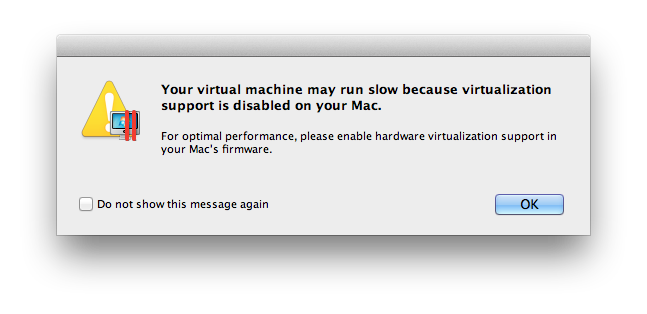

Shiet I was like, DAMN!!! It's not working on me again!!! I bet you have the same idea as me, I hope this will help you! :D
1. Launch AppleScript Editor (it's in Utilities folder. You can also use spotlight to search if you're on OS X Lion).
2. Create a new file (File > New)
3. Copy and paste this into the editor:
 or download from HERE
Tada~ now I can open Windows XP on my MacBook like it's belong to Mac!!
1. Launch AppleScript Editor (it's in Utilities folder. You can also use spotlight to search if you're on OS X Lion).
2. Create a new file (File > New)
3. Copy and paste this into the editor:
do shell script "for x in prl_hypervisor prl_hid_hook prl_usb_connect prl_netbridge prl_vnic; dosudo kextutil -q \"/Library/Parallels/Parallels Service.app/Contents/Kexts/10.6/$x.kext\"done" with administrator privilegesdo shell script "open -a \"/Applications/Parallels Desktop.app\""4. Select File > Save, call it Parallels Desktop Launcher, put it it the Applications folder and set type to Application:

Tada~ now I can open Windows XP on my MacBook like it's belong to Mac!!
For me, after I installed my PD, there wasn't any internet connections on my Windows XP, so what I did was this~
1. Open virtual machine configuration and change the OS type for your virtual machine to the correct one - Windows XP
 |
| configuration option is at the bottom right side, the icon looks like a tool~ |

2. Switch to Hardware tab and in Boot order section insert the following string under boot flags:
devices.net.force_adapter_type=rtl

3. Click OK to save and close configuration. Then, start the virtual machine and install the network adapter. (if it's not installing automatically)
TADAAA~ now you're ready to play windows games on MAC! :DD (Sorry people... I'm just THAT desperate... = =)


Yayyy!!! This post has finally come to an end! I really hope this would help anyone of you who has problem out there! I tried this program few times in different ways but they all failed! So I kinda combined some other ways, and this it successe! I even tried to install on my friend's MacBook Pro OS X Lion, it's working perfectly too! :D Hope you enjoy your outcome! ;)


 |
| And one of my favourite online music streaming software~! :D |
Yayyy!!! This post has finally come to an end! I really hope this would help anyone of you who has problem out there! I tried this program few times in different ways but they all failed! So I kinda combined some other ways, and this it successe! I even tried to install on my friend's MacBook Pro OS X Lion, it's working perfectly too! :D Hope you enjoy your outcome! ;)
Labels: Parallels Desktop, Parallels Desktop Launcher, Parallels Desktop internet connection, Parallels Desktop Tutorial, Mac, MacBook Pro, Dragon Nest, Play Dragon Nest on Mac, Dragon Nest for Mac, Online RPG, MMORPG, Windows XP on Mac, Windows XP, fun, random, install, knowledge, software, application, free, download, torrent, crack, keygen, activation key.


